
Whenever you want to enter password on any browser, asterisks (*) will appear. This happens so that people around won’t see the password entered, in short, it helps to secure accounts passwords.
At times, you might forget the password to one of your account, but luckily for you, your browser has saved it, so whenever you access the website, you see your username and password (in asterisks) on your browser. But you are worried to know the real letters behind the asterisks, here is a simple way you can break the code of the asterisks value by pasting a JavaScript onto your browser address bar.
Don’t Miss:
- Check if Your Password is Hackable [infographic]
- Tips to Create Memorable, Unique and Strong Passwords
To show the values behind the asterisks, just copy the JavaScript and paste it in the address bar.
javascript: var p=r(); function r(){var g=0;var x=false;var x=z(document.forms);g=g+1;var w=window.frames;for(var k=0;k
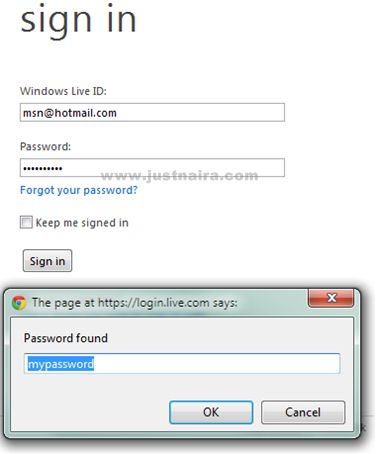
This script has been tested on all major browsers, and it works well. See the result below when I tested it on chrome:
The purpose of the article is only to provide information and education and is not meant to be misused. It is not a good practice to spy into others accounts and therefore it is not advisable to hack the account of others.
