
Hotspot Shield VPN software has a nice speed, and this VPN software is provided by Anchorfree to give its users free access to speedy and quality VPN like premium users, but the only thing they want from users in return is to embed ads on the top of any page they visits.
Note that this trick may not work properly with the latest Hotspot Shield program. Visit all ads network blocker page to learn how you can block all ads network on your computer screen whenever you are surfing the net including Hotspot Shield Latest Program Ads.

To many users, the ads that pop-up restlessly are annoying. So today, a post has been prepared to help get rid of those ads that keeps popping-up restlessly.
Steps to Remove Annoying Hotspot Shield ads
There are many ways to remove those annoying Hotspot shield ads, but today, the easiest and the 100% working method would be share.
1. Go to “My Computers”, Open your system drive/disk i.e. “C” where Windows is installed, then click windows > system 32 >drivers > etc. Once you get to the “etc” folder, you will see some files but right click on the file named “hosts” and select open with “Notepad”.
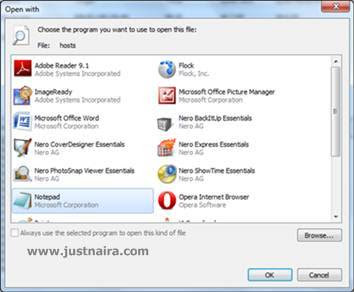
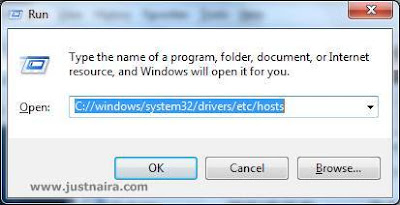
2. If you are lazy and can’t go through the long process in step 1, then bring out the Run window by pressing Win key+R on your Window Pc keyboard. Once the window opens, paste C://windows/system32/drivers/etc/hosts into the box and press enter then open it with notepad.
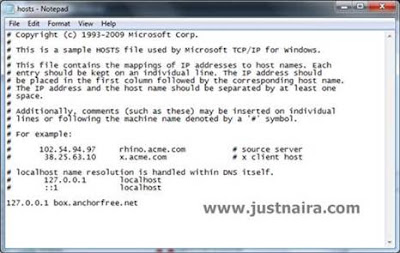
3. Scroll down then copy and paste the code below into the blank space. After that, click file on the top of the Notepad window, then click on save.
127.0.0.1 box.anchorfree.net
It should look like this:
4. Finally, clear your entire browser Cache.
You now say goodbye to Hotspot Shield ads forever. If you encounter any difficulties just make use of the comment box below.
